Back to Projects

Cleankey

Clean Your Keyboard
Menu Bar UtilityB2CProduct DesignmacOSSwiftUIOpen Source

A tiny native macOS menu bar utility that temporarily blocks every key, including modifiers, function keys and media controls, so you can wipe down a keyboard without accidental input.

Role
Solo product design and macOS development
Timeframe
January 2026 to August 2026
Year
2026
Tools
Xcode, Swift, SwiftUI, ApplicationServices, ServiceManagement, GitHub Actions, Codex, Claude Code, MCP
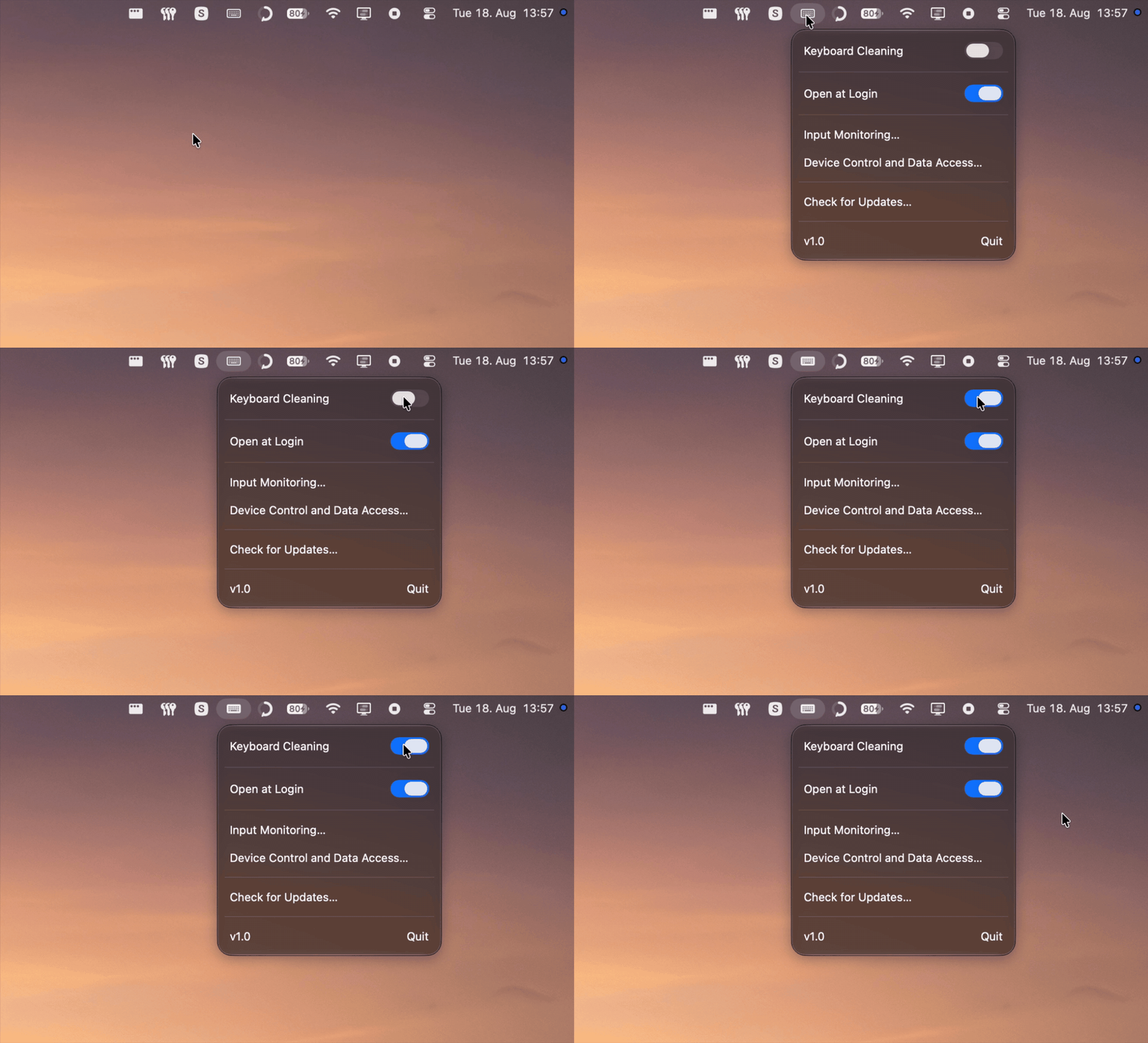
Cleankey menu-bar utility switching keyboard cleaning on and off
One switch blocks the keyboard. The pointer stays live, so you can switch it off again.

A tiny fix for an irritating moment

Cleaning a keyboard while the Mac is awake usually means opening apps, typing nonsense, changing the volume or triggering a shortcut. Shutting down works, but it turns a quick wipe into a small ceremony. I wanted the utility I kept looking for: there when the cloth comes out, gone again afterwards.

So the whole product is one popover. The switch sits first, with an active state you cannot misread, and everything under it stays secondary. Cleankey runs as an accessory app, so it never shows up in the Dock or the app switcher. No window to arrange, no preferences to set up.

Every row in the popover

The Cleankey menu-bar popover with Keyboard Cleaning switched on, Open at Login enabled, both permission rows, an update check and the version and Quit row
Keyboard Cleaning
The one control the app exists for. While it is on, Cleankey discards every key before the frontmost app sees it.
Open at Login
Registers the app through ServiceManagement, so it is back in the menu bar after a restart without a helper tool or a stray login item.
Input Monitoring
The first macOS permission, and the one that lets Cleankey see key events at all. Cleankey uses it only while blocking, and records or sends nothing you type. The row opens the exact pane in System Settings rather than a general privacy page.
Device Control and Data Access
The second permission. Seeing events is not enough to stop them, so this one lets the tap discard a key instead of passing it along.

Blocking at the right level

A regular SwiftUI keyboard handler only sees input inside its own window. Cleankey installs a CGEvent tap at the HID level instead and discards keyboard events before the active app receives them, which covers ordinary typing along with command shortcuts, function keys, volume and playback controls. Mouse and trackpad events pass through on purpose. An app that can block every key can also lock you out of its own off switch.

macOS may disable an event tap after a timeout or a burst of input, so Cleankey watches for that and turns it back on. Nothing sits between the menu-bar switch and the system APIs. The universal v1.1 download is 225 KB of native Swift and SwiftUI, with no third-party packages in it.

Those privileges do not fit the Mac App Store sandbox, so Cleankey ships as a free GitHub release, signed with a Developer ID certificate and notarized by Apple, for Macs on macOS 14 or later. The source is public, which is the point for a utility that asks to watch your keyboard. Update checks look at the same releases page and never install anything on their own.

From first commit to v1.0

The first commit landed in January 2026. By February the core interaction and the system-level blocking worked. The months to August went into the parts that turn that into a release: permission recovery, launch-at-login behavior, update checks, a universal build, code signing, notarization and an automated GitHub release workflow.

I designed and built Cleankey solo, using Codex and Claude Code alongside Xcode, the command line and MCP. Version 1.1 build 8 keeps the constraint I started with: one switch, and nothing between a dirty keyboard and a clean one.